

목차
GitHub Actions은 GitHub에서 제공하는 CI/CD (Continuous Integration/Continuous Deployment) 플랫폼으로, 코드를 푸시하거나 Pull Request를 열 때마다 자동으로 빌드, 테스트, 배포 등의 작업을 수행하는 파이프라인을 구축할 수 있다. 이를 통해 개발 워크플로우를 간소화하고, 코드 변경이 일어날 때마다 안정적으로 프로젝트가 관리되도록 할 수 있다. Jenkins와 ArgoCD를 통해 쿠버네티스 환경에서 CI/CD를 구현해봤지만 이번 글에서는 Github Action을 통해 CI만 다뤄볼 생각이다. CI/CD에 대한 구체적인 설명은 생략하도록 하겠다.
GitHub Actions의 주요 특징
- 다양한 환경 지원: GitHub Actions는 리눅스, 윈도우, 맥OS 가상 환경을 제공하며, 필요한 경우 사용자가 설정한 환경에 맞춰 별도의 서버를 구성할 수 있는 self-hosted runner도 지원한다.
- 자동화된 워크플로우 구성: GitHub Actions의 파이프라인은 워크플로우 파일 (.yml 형식)로 설정하며, 이 파일을 통해 어떤 이벤트(코드 푸시, Pull Request 등)를 트리거로 할 것인지와 각 단계에서 어떤 작업을 수행할지 정의할 수 있다.
- 다양한 작업 조합 가능: GitHub Actions는 오픈 소스 커뮤니티에서 제공하는 다양한 액션(작업의 기본 단위)을 통해 쉽게 설정할 수 있으며, 자신만의 액션을 만들어 재사용할 수도 있다. 예를 들어, 코드 테스트, Docker 이미지 빌드 및 배포, 애플리케이션 배포 등 여러 작업을 조합하여 자동화된 파이프라인을 구성할 수 있다는 장점이 있다.
GitHub Action 구성 요소
Workflow
- 워크플로우는 GitHub Actions의 가장 큰 단위로, .github/workflows 폴더에 .yml 파일 형식으로 정의된다.
- 각 워크플로우 파일은 특정 이벤트(코드 푸시, PR 생성 등)가 발생할 때 실행할 일련의 작업을 정의한다.
- 하나의 리포지토리에 여러 워크플로우 파일을 만들어 다양한 파이프라인을 동시에 관리할 수 있다.
- 다른 구성요소의 전체적인 가장 큰 틀이라고 생각하면 된다.
Event
- workflow를 실행하는 활동 및 규칙을 지정한다.
- 예를 들어 git 저장소에서 commit 또는 pull_request, schedule과 같은 요소들을 이벤트로 정의하며, 이러한 이벤트에 의해 특정 브랜치에서만 작동하도록 설정할 수도 있다.
Jobs
- 각 워크플로우는 여러 개의 Job으로 구성되고 job은 여러 Step으로 구성된다.
- 하나의 Job은 독립적으로 실행되는 작업 단위로, 빌드, 테스트, 배포와 같이 분리된 작업을 의미한다.
- 기본적으로 Job은 병렬로 실행되지만, 종속성 설정을 통해 순차적으로 실행되도록 구성할 수 있다.
Step
- Step은 각 Job 내에서 실행되는 단계이다.
- Job이 실제로 수행할 작업을 정의하며, 예를 들어 코드 체크아웃, 의존성 설치, 테스트, 배포 같은 세부 작업들이 Step으로 구성된다.
- Step은 Shell 명령어나 GitHub Actions 커뮤니티에서 제공하는 다양한 Action을 사용할 수 있다.
Action
- job을 구성하기 위한 step들의 조합으로 구성된 독립적인 명령이다. workflow의 가장 작은 빌드 단위라고 보면된다.
- workflow에서 action을 사용하기 위해서는 action이 step을 포함해야 한다.
- GitHub에서 기본 제공하는 Action이나 커뮤니티에서 만든 Action을 사용할 수 있으며, 자주 사용하는 기능을 캡슐화하여 재사용하기에 좋다.
- 예를 들어, actions/checkout은 코드를 체크아웃하는 Action이고, actions/setup-node는 Node.js 환경을 설정하는 Action이다.
Runner
- Runner는 실제로 워크플로우를 실행하는 가상 머신 또는 서버이다.
- GitHub에서 제공하는 기본 Hosted Runner가 있고, 사용자가 직접 구성한 Self-hosted Runner를 통해 특정 환경에서 실행되도록 설정할 수도 있다.
- Runner는 Step을 순차적으로 실행하여 결과를 GitHub에 업데이트한다.
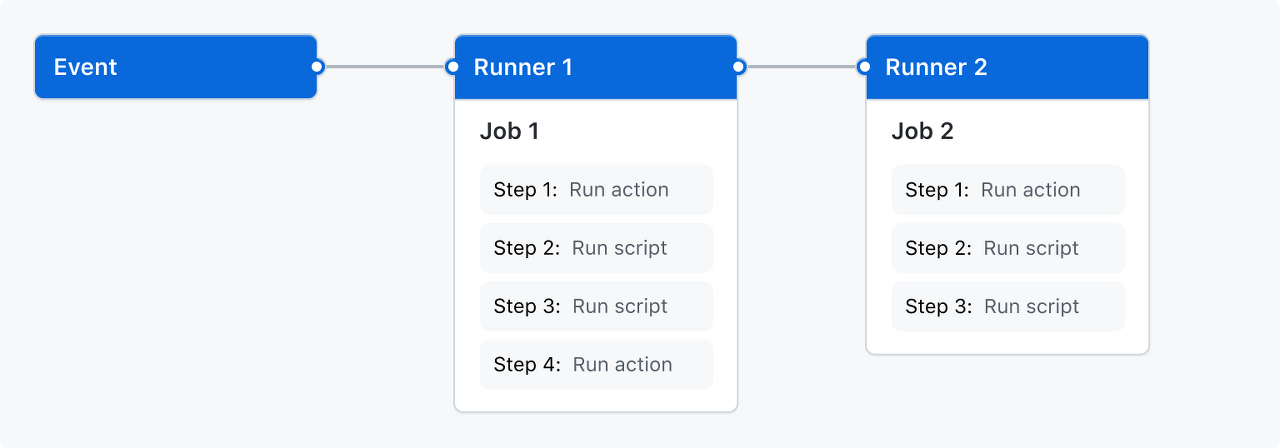
예시
name: Backend CI

on:
  pull_request:
    branches: [develop]

jobs:
  build:
    runs-on: ubuntu-latest

    steps:
      - uses: actions/checkout@v3
      - name: Build Project
        run: ./gradlew build
      - name: Run Tests
        run: ./gradlew test
name
- name: Backend CI
워크플로우의 이름을 정의한다.
on
- on: pull_request
워크플로우를 실행하는 이벤트를 정의한다. 이 경우 pull_request 이벤트가 develop 브랜치에 발생했을 때 워크플로우가 실행되도록 설정 하였다.
jobs
- build
Job의 이름을 정의한다. Job은 워크플로우 내에서 실행되는 개별 작업 단위로, 여기서는 build라는 이름의 Job을 정의했다. - runs-on: ubuntu-latest
Job이 실행될 호스트 환경을 정의합니다. 이 경우 ubuntu-latest 가상머신에서 Job이 실행되도록 설정했다.
steps
- uses: actions/checkout@v3
GitHub의 checkout 액션을 사용하여 현재 레포지토리를 pull하고 이동하는 단계이다. 대부분의 워크플로우에서 기본적으로 사용된다. - run: ./gradlew build
run 키워드를 통해 Runner가 실행되는 서버에서 명령어를 실행한다.
GitHub Actions를 활용한 Node.js CI 파이프라인 구축하기
GIt 연동후 Reopository에 push
Git에 소스코드를 Push 해준다. (GIt token 발급은 생략)
root@dj-master:~/nodejsci# git init
Initialized empty Git repository in /root/nodejsci/.git/

root@dj-master:~/nodejsci# ls -al
total 76
drwxr-xr-x  5 root root  4096 Oct 29 23:55 .
drwx------ 35 root root  4096 Oct 29 23:53 ..
-rw-r--r--  1 root root   421 Aug 12 23:17 Dockerfile
-rw-r--r--  1 root root    27 Aug 12 23:17 .dockerignore
drwxr-xr-x  7 root root  4096 Oct 29 23:55 .git
drwxr-xr-x 59 root root  4096 Aug 12 23:17 node_modules
-rw-r--r--  1 root root   271 Aug 12 23:17 package.json
-rw-r--r--  1 root root 40385 Aug 12 23:17 package-lock.json
drwxr-xr-x  3 root root  4096 Oct  1 19:12 public
-rw-r--r--  1 root root   531 Aug 12 23:17 server.js

root@dj-master:~/nodejsci# git add .
root@dj-master:~/nodejsci# git config --global user.email dongju08@naver.com
root@dj-master:~/nodejsci# git config --global user.name "dongjucloud"
root@dj-master:~/nodejsci# git commit -m "nodejs-CI"
[master (root-commit) 1e60b27] nodejs-CI
 401 files changed, 61776 insertions(+)
 create mode 100644 .dockerignore
 create mode 100644 Dockerfile
 create mode 100644 node_modules/.package-lock.json
....
 create mode 100644 public/styles.css
 create mode 100644 server.js

root@dj-master:~/nodejsci# git remote add origin https://github.com/dongjucloud/nodejs-ci.git
root@dj-master:~/nodejsci# git remote -v
origin  https://github.com/dongjucloud/nodejs-ci.git (fetch)
origin  https://github.com/dongjucloud/nodejs-ci.git (push)
root@dj-master:~/nodejsci# git branch -M main
root@dj-master:~/nodejsci# git push -u origin main
Username for 'https://github.com': dongjucloud
Password for 'https://dongjucloud@github.com':
Enumerating objects: 488, done.
Counting objects: 100% (488/488), done.
Delta compression using up to 2 threads
Compressing objects: 100% (471/471), done.
Writing objects: 100% (488/488), 2.90 MiB | 2.40 MiB/s, done.
Total 488 (delta 78), reused 0 (delta 0)
remote: Resolving deltas: 100% (78/78), done.
To https://github.com/dongjucloud/nodejs-ci.git
 * [new branch]      main -> main
Branch 'main' set up to track remote branch 'main' from 'origin'.
Git Workflow 생성
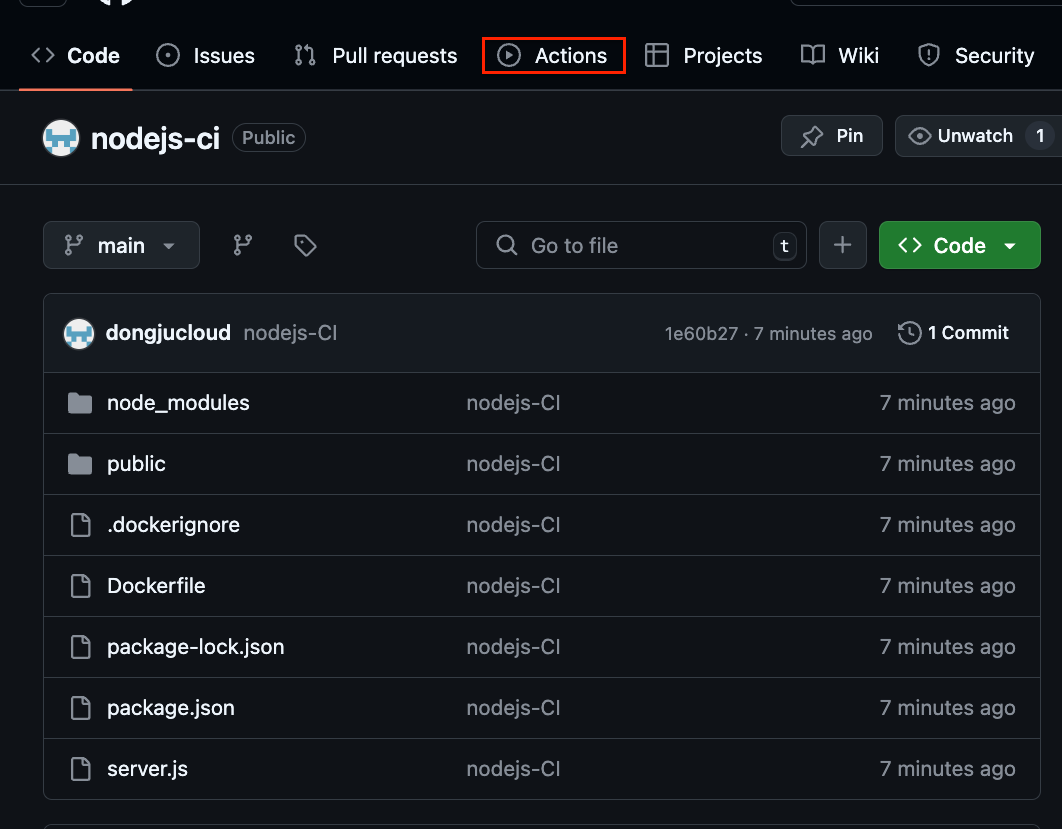
Action -> set up a workflow yourself(깜빡하고 gitignore. 설정을 빠트렸다...)
YAML 코드 작성
name: Push Docker Image to Docker Hub

on:
  push:
    branches:
      - 'main'
    tags:
      - '**'

jobs:
  push:
    runs-on: ubuntu-latest
    steps:
      - name: Checkout
        uses: actions/checkout@v2

      - name: Docker meta
        id: docker_meta
        uses: crazy-max/ghaction-docker-meta@v1
        with:
          images: dongjukim123/nodejs-ci
          tag-semver: |
            {{version}}
            {{major}}.{{minor}}

      - name: Set up QEMU
        uses: docker/setup-qemu-action@v2

      - name: Set up Docker Buildx
        uses: docker/setup-buildx-action@v2

      - name: Login to Docker Hub
        uses: docker/login-action@v2
        with:
          username: ${{ secrets.DOCKER_HUB_USERNAME }}
          password: ${{ secrets.DOCKER_HUB_PASSWORD }}

      - name: Build and push Docker Image
        uses: docker/build-push-action@v4
        with:
          context: .
          push: true
          tags: ${{ steps.docker_meta.outputs.tags }}
          labels: ${{ steps.docker_meta.outputs.labels }}
간단하게 Yaml 파일을 해석해보면 이 구성은 main 브랜치에 변경 사항을 푸시하거나 모든 태그로 푸시될 때 트리거 된다.
- Checkout: 저장소 코드를 가져와 설정한 브랜치로 체크아웃한다.
- Docker meta: Docker 이미지 태그 정보를 설정한다. (dongjukim123/nodejs-ci라는 Docker 리포지토리 사용).
- Set up QEMU: 여러 플랫폼에서 에뮬레이션을 위해 QEMU를 설정한다.
- Set up Docker Buildx: 다중 플랫폼 빌드를 위해 Docker Buildx를 설정한다.
- Login to Docker Hub: Docker Hub에 로그인하고 자격 증명은 secrets에서 가져온다
- Build and push Docker Image: Docker 이미지를 빌드하고 main 브랜치에 푸시될 때 Docker Hub로 이미지를 푸시한다.
Docker Hub Repository 생성
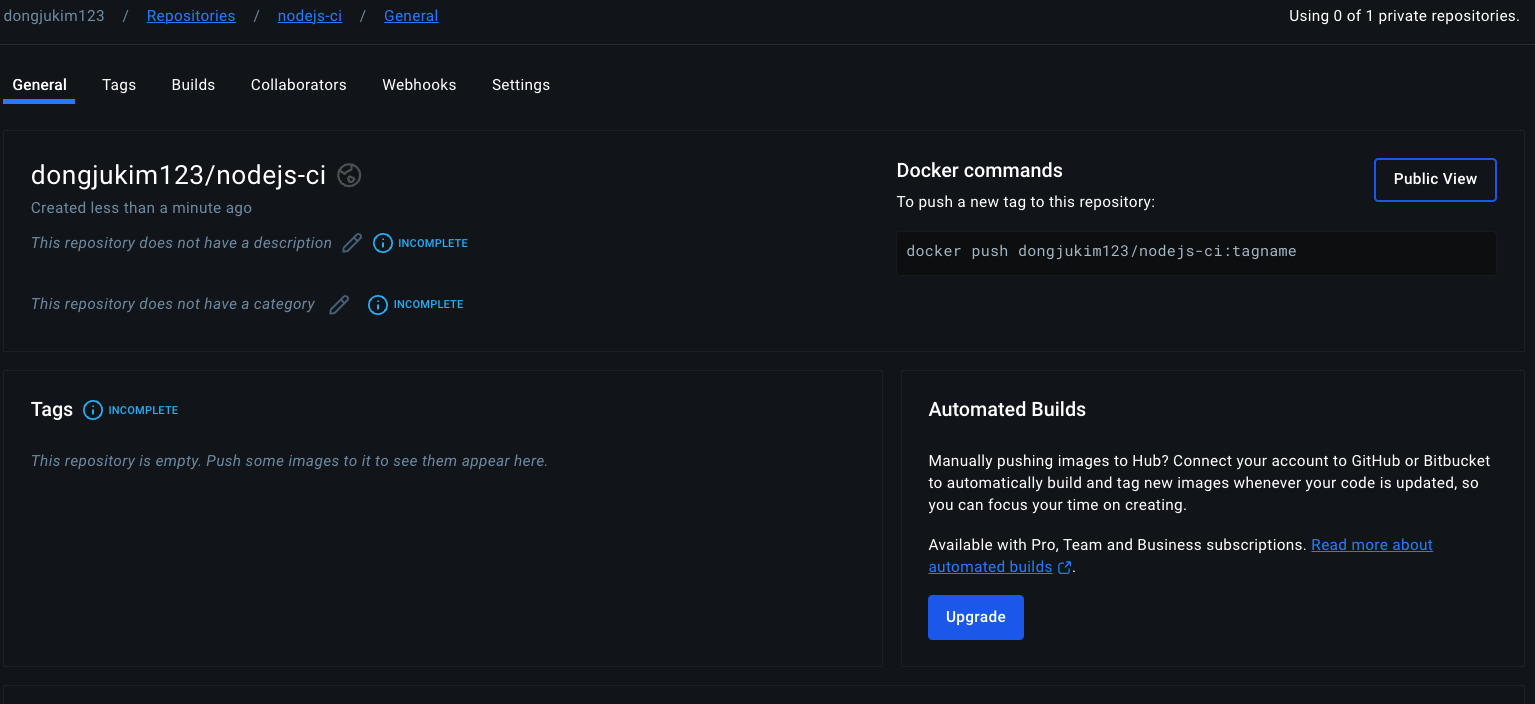
Docker Hub Repository에서 이미지를 Push할 Repository를 생성해준다.
Git Secret 변수 입력
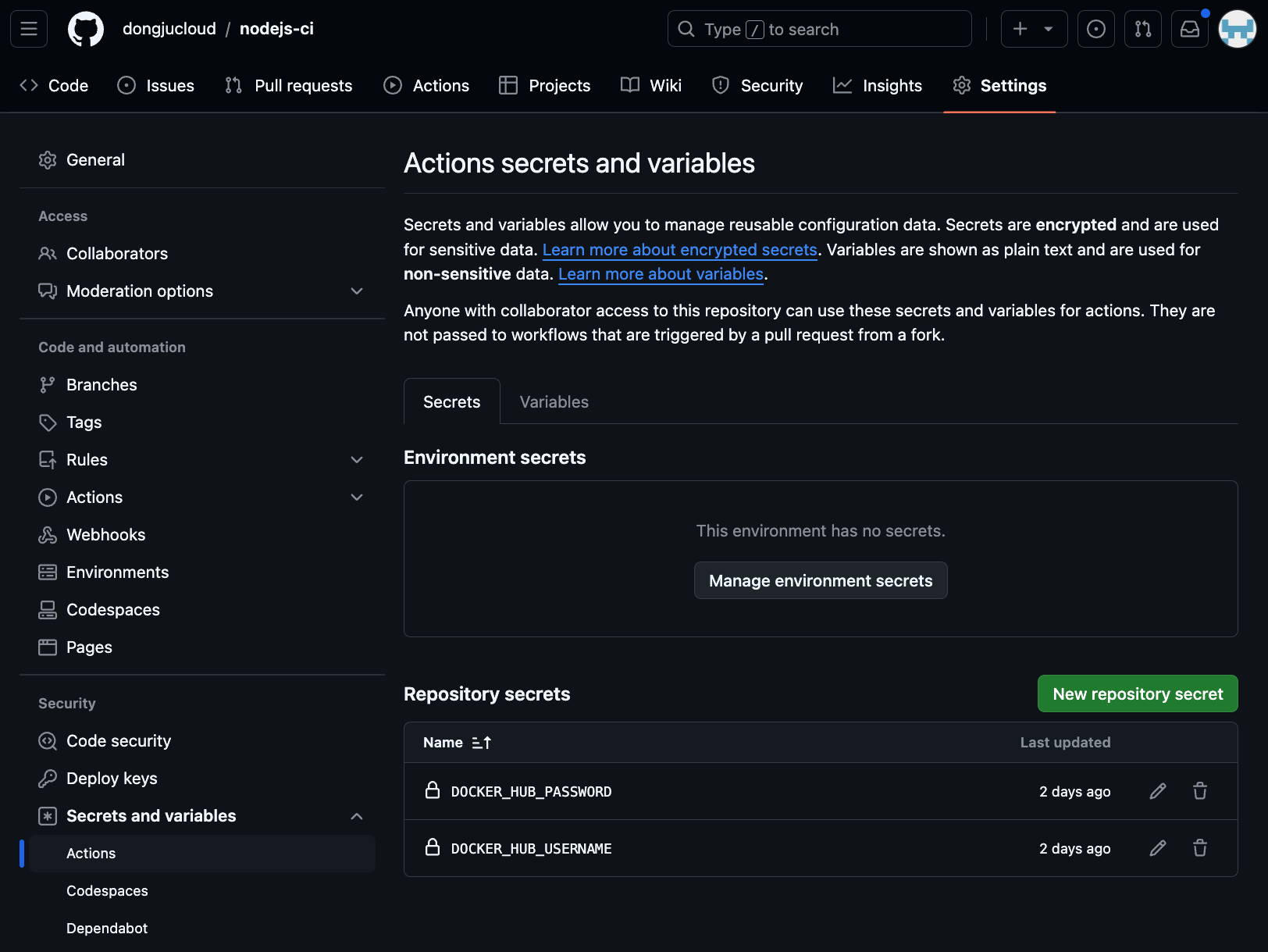
현재 Actions 창에서 생성해둔 workflow 선택 -> Settings -> Secretes and variabels -> Actions -> Docker Hub Username,
Token 값을 Yaml파일에 변수처리해둔 네이밍으로 작성해준다.
코드 수정후 Push 작업
root@dj-master:~/nodejsci# vi public/index.html
root@dj-master:~/nodejsci# git status
On branch main
Your branch is up to date with 'origin/main'.

Changes not staged for commit:
  (use "git add <file>..." to update what will be committed)
  (use "git restore <file>..." to discard changes in working directory)
        modified:   public/index.html

no changes added to commit (use "git add" and/or "git commit -a")
root@dj-master:~/nodejsci# git add .
root@dj-master:~/nodejsci# git status
On branch main
Your branch is up to date with 'origin/main'.

Changes to be committed:
  (use "git restore --staged <file>..." to unstage)
        modified:   public/index.html

root@dj-master:~/nodejsci# git commit -m "nodejs-CI"
[main e965f4e] nodejs-CI
 1 file changed, 1 insertion(+), 1 deletion(-)

root@dj-master:~/nodejsci# git push
Username for 'https://github.com': dongjucloud
Password for 'https://dongjucloud@github.com':
To https://github.com/dongjucloud/nodejs-ci.git
 ! [rejected]        main -> main (fetch first)
error: failed to push some refs to 'https://github.com/dongjucloud/nodejs-ci.git'
hint: Updates were rejected because the remote contains work that you do
hint: not have locally. This is usually caused by another repository pushing
hint: to the same ref. You may want to first integrate the remote changes
hint: (e.g., 'git pull ...') before pushing again.
hint: See the 'Note about fast-forwards' in 'git push --help' for details.

root@dj-master:~/nodejsci# git pull origin main
remote: Enumerating objects: 6, done.
remote: Counting objects: 100% (6/6), done.
remote: Compressing objects: 100% (3/3), done.
remote: Total 5 (delta 1), reused 0 (delta 0), pack-reused 0 (from 0)
Unpacking objects: 100% (5/5), 1.51 KiB | 1.51 MiB/s, done.
From https://github.com/dongjucloud/nodejs-ci
 * branch            main       -> FETCH_HEAD
   1e60b27..251b66f  main       -> origin/main
Merge made by the 'recursive' strategy.
 .github/workflows/main.yml | 47 +++++++++++++++++++++++++++++++++++++++++++++++
 1 file changed, 47 insertions(+)
 create mode 100644 .github/workflows/main.yml

root@dj-master:~/nodejsci# git push origin main
Username for 'https://github.com': dongjucloud
Password for 'https://dongjucloud@github.com':
Enumerating objects: 12, done.
Counting objects: 100% (10/10), done.
Delta compression using up to 2 threads
Compressing objects: 100% (6/6), done.
Writing objects: 100% (6/6), 640 bytes | 640.00 KiB/s, done.
Total 6 (delta 3), reused 0 (delta 0)
remote: Resolving deltas: 100% (3/3), completed with 2 local objects.
To https://github.com/dongjucloud/nodejs-ci.git
   251b66f..8d179b7  main -> main
public/index.yml 파일을 수정한 후 다시 Git에 푸시하려 했지만, 현재 로컬 리포지토리에는 워크플로우 파일이 추가된 상태라 푸시가 거부되었다. 로컬 리포지토리에 해당 워크플로우 파일이 없기 때문에, 원격 리포지토리와 로컬 리포지토리의 내용을 일치시켜야 한다. 그래서 git pull로 최신 변경 사항을 로컬로 가져와야 하며, 이후 git push를 다시 시도하여야 한다. 그런 다음 GitHub Actions에서 작업이 잘 실행되는지 확인하면 된다.
Git Action 작업 확인
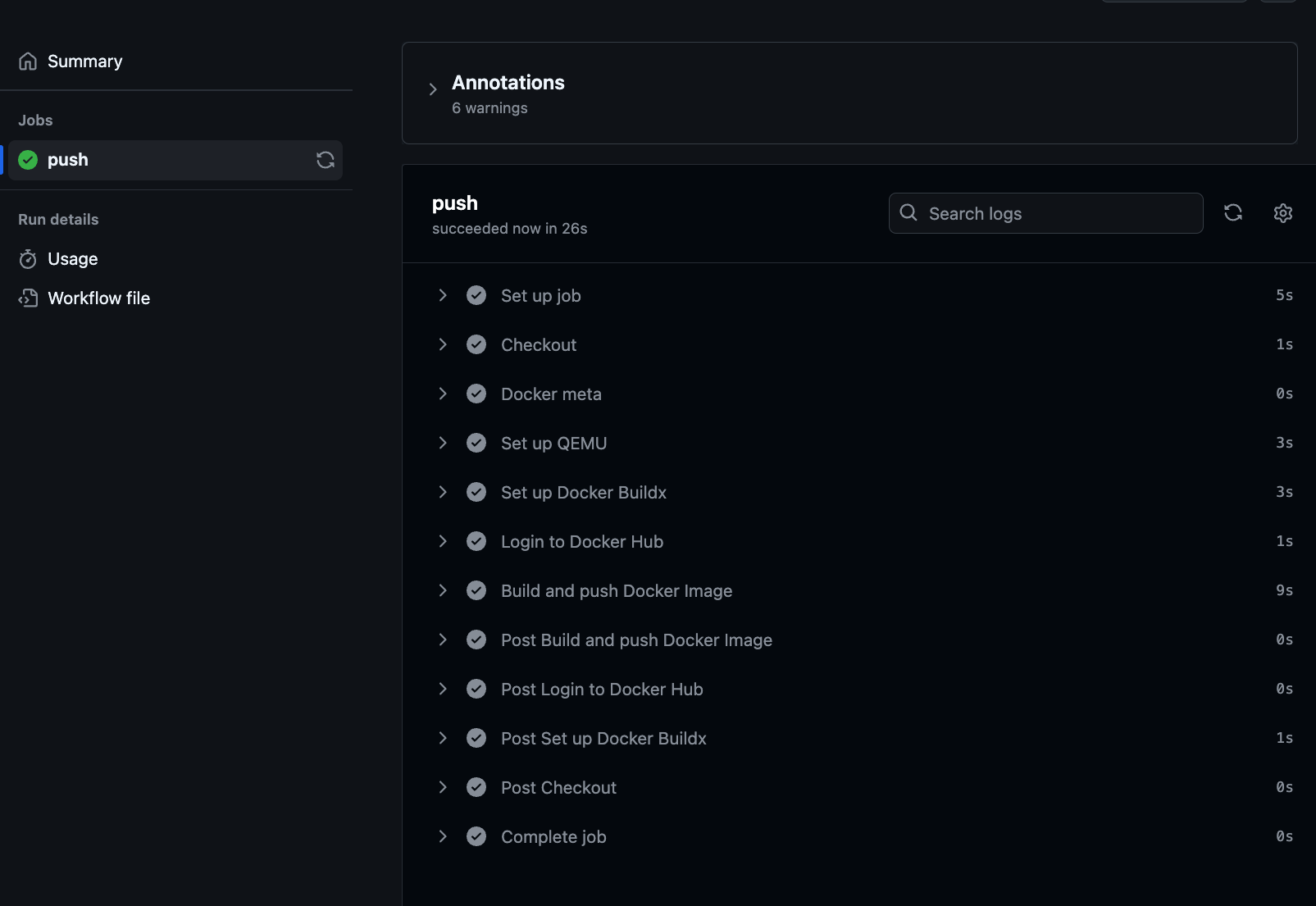
정상적으로 workflow가 실행된것을 확인할 수 있다.
Docker Hub Repository 확인

Docker Hub Repository에도 이미지가 잘 빌드된것을 확인할 수 있다.
Git Release
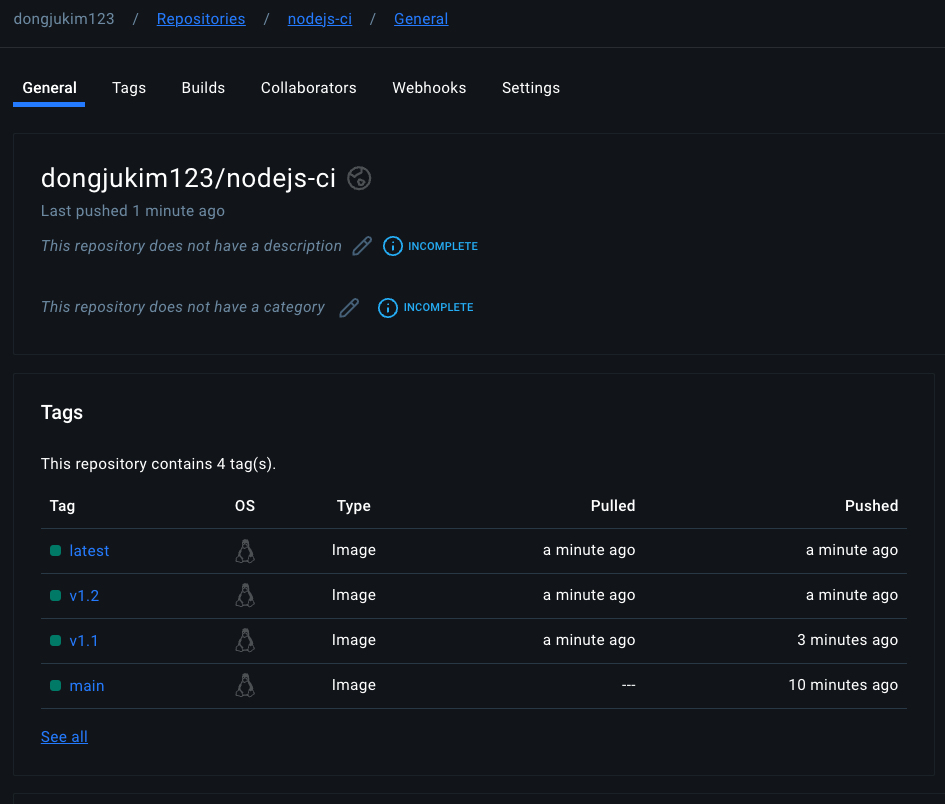
하지만 Git에 버전 정보를 명시하려면 매번 수동으로 릴리즈 작업을 통해 태그를 지정해야 한다. 다음에는 릴리즈 작업까지 자동화해보겠다.